Should You Migrate Your Webflow Website to Astro? 🚀
A real-world case study from rebuilding one of my own projects — Mandala — from the ground up.
TL;DR — Webflow is still my go-to for most client work. But for animation-heavy, performance-critical projects, rebuilding in Astro cut JavaScript weight dramatically and gave me full control over the codebase. Neither tool "wins" — they solve different problems. Skip to the verdict if you're in a hurry.
🧭 Where This Started
If you've followed my work for a while, you probably know that Webflow has been my primary development tool for the last few years — and honestly, it still is one of the best platforms for building modern marketing websites. It lets me move fast while giving clients an easy way to manage their own content.
But recently, I started asking myself one question:
Can I keep the same beautiful design while making the website even faster?
That curiosity led me to rebuild one of my previous projects — Mandala — using Astro.
This isn't a "Astro is better than Webflow" hit piece. It's a breakdown of what I learned during the migration, how the performance actually compares, and whether making the jump makes sense for your website too.
💭 Why I Even Considered Astro
To be clear — I still use Webflow almost every week, and I think most businesses should keep using it.
But some of my recent projects had gotten increasingly animation-heavy, performance-focused, and packed with custom JavaScript. Eventually I hit a point where I thought:
"If I'm already writing this much custom code anyway... why not own the entire frontend?"
That's where Astro caught my attention. Unlike Webflow, Astro generates mostly static HTML and only ships JavaScript when it's actually needed — an approach called Astro Islands. For websites where every millisecond matters, that's a serious advantage.
🎨 Meet the Case Study: Mandala

One of the first websites I decided to migrate was Mandala.
Short story about Mandala, its a Framer Template by VeloxThemes. They have a lot of templates that are very popular and they are known for their quality. I adore the quality of Bayu and Gil works as it creator. They giving me an opportunity to convert this template into Webflow, and we agree that they may expand it to Astro. So here we are...
The site includes:
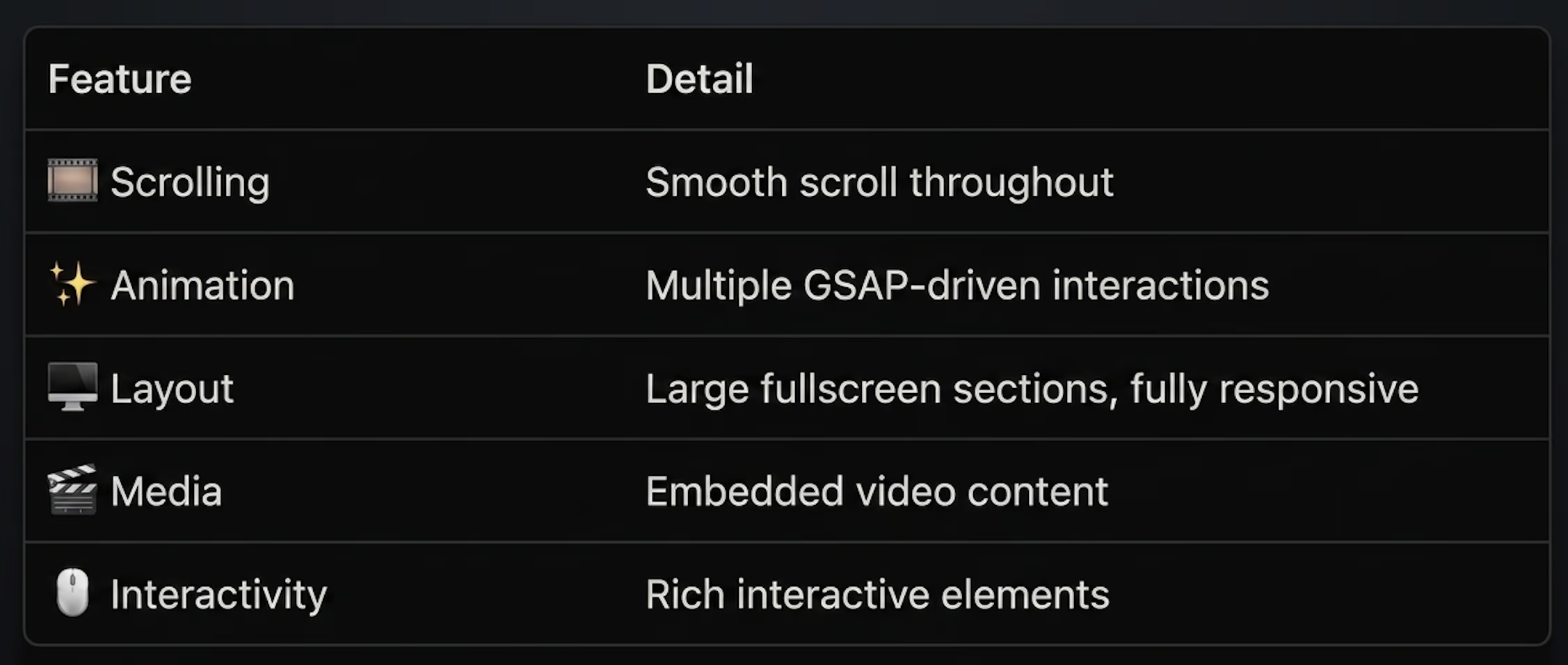
In short — exactly the kind of site that pushes Webflow to its limits.
Instead of redesigning it, the goal was simple:
Rebuild the exact same experience in Astro while improving performance.
🔧 The Migration Process

The migration wasn't just copying HTML over. I rebuilt every section into reusable Astro components while keeping the original design as close to pixel-perfect as possible.
Some parts were actually easier — component-based architecture made the project far simpler to organize than juggling everything inside a visual builder.
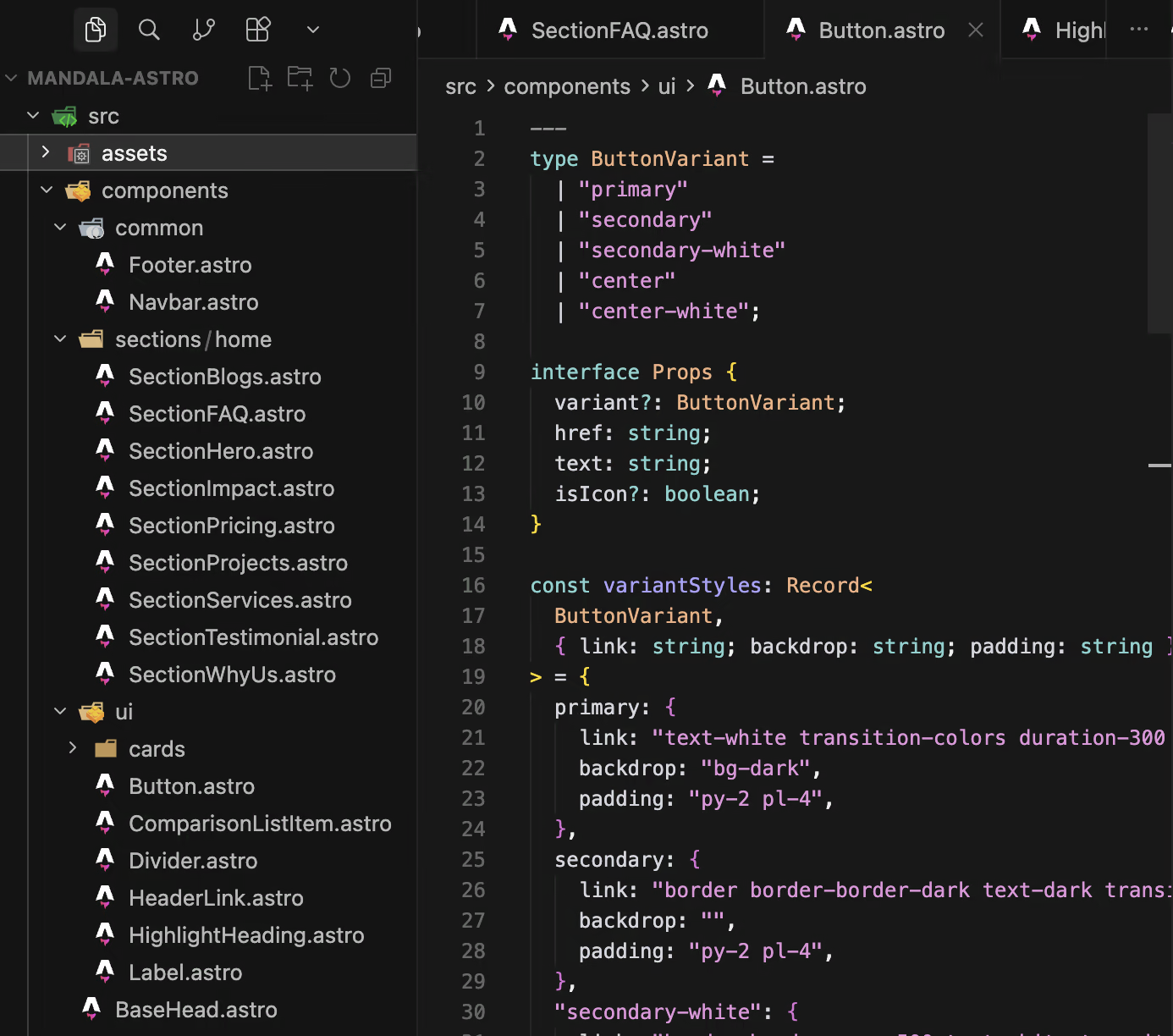
The biggest challenge was recreating Webflow's native interactions. Instead of relying on Webflow Interactions, I rebuilt them using GSAP, which ended up giving me far more flexibility and control than the original setup.
📊 Performance Comparison
One of the biggest reasons people migrate away from visual builders is performance. So — did Astro actually move the needle?
JavaScript Payload
This is probably Astro's single biggest advantage. By default, Astro ships almost no JavaScript unless it's explicitly required. Webflow, by contrast, always loads its own runtime scripts to power interactions, CMS functionality, and other built-in features.
According to Astro's official architecture, this "ship less JavaScript" philosophy often leads to faster loading websites, especially on slower devices.
Lighthouse Scores
While every project is different, community benchmarks consistently show Astro achieving excellent Lighthouse scores thanks to its minimal JavaScript footprint and static rendering.
For Mandala specifically, I noticed improvements across the board:
- ⚡ Faster page rendering
- ⏱️ Better Time to Interactive
- 📦 Lower JavaScript bundle size
- 📈 Higher overall Lighthouse score
🖼️ Screenshot comparison coming soon — I'll update this article with exact before/after numbers once I've benchmarked both versions under identical conditions.
⚖️ Webflow vs Astro — Head to Head
Here's how I personally rate both platforms after using them extensively:
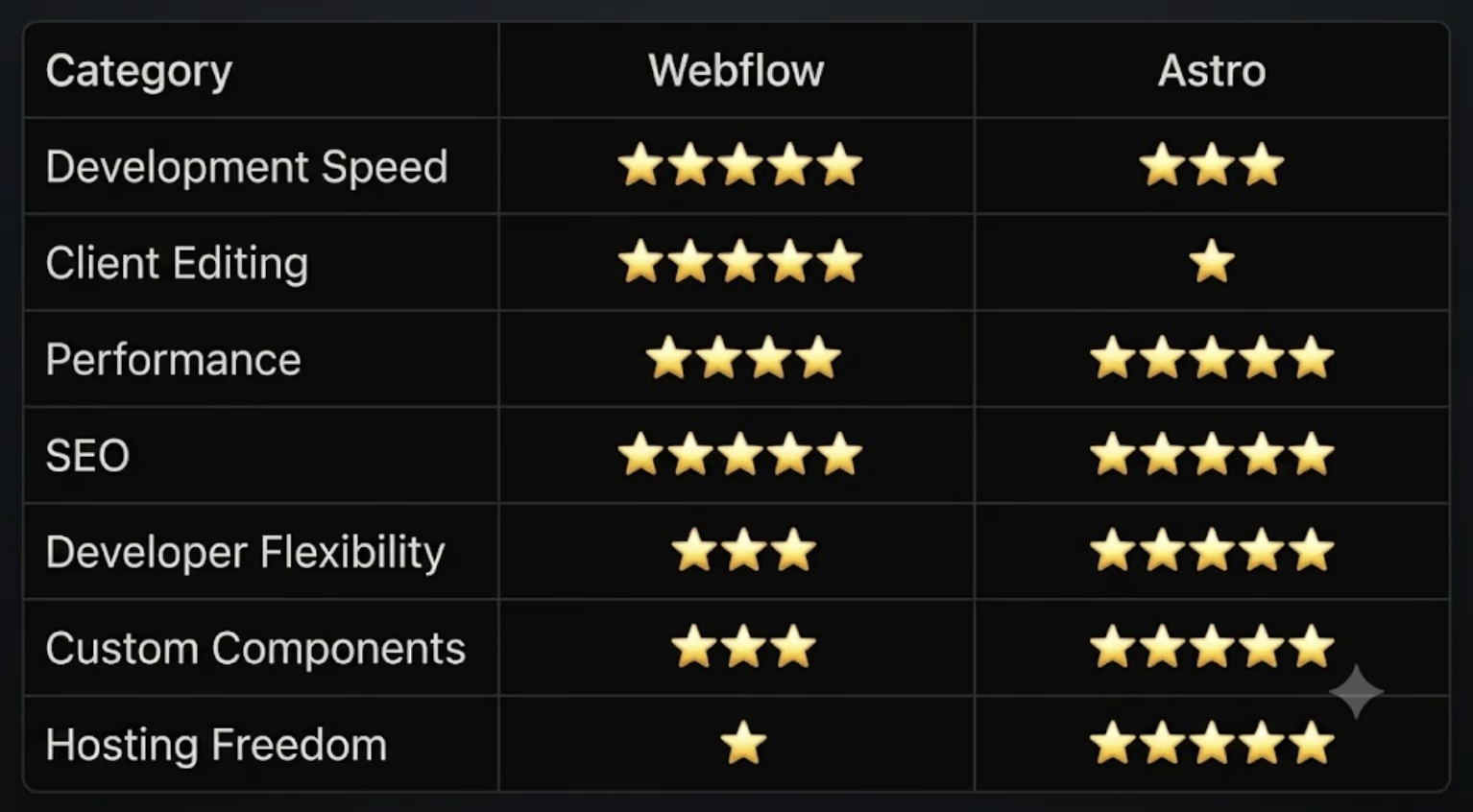
Neither one is objectively better — they're simply built for different goals.
🟢 When You Should Stay on Webflow
Honestly? Probably more often than you'd think. I usually recommend sticking with Webflow if:
- Your marketing team updates content frequently
- You rely heavily on the CMS Editor
- You don't have an in-house developer
- Your website already performs well enough
- You value fast iteration over absolute performance
For landing pages, startup sites, agency websites, and company profiles — Webflow is still fantastic.
🔵 When Astro Starts Making Sense
Astro becomes much more attractive when:
- Performance directly affects conversions
- SEO is one of your biggest acquisition channels
- You have lots of custom JavaScript
- You're already comfortable with Git
- You want complete control over your codebase
- Your project is becoming more like an application than a simple website
For developers, Astro feels incredibly refreshing — everything is version controlled, everything is component-based, everything is yours.
🤔 So... Am I Leaving Webflow?
Not at all.
Webflow is still my first recommendation for many client projects. Astro simply became another tool in my toolbox. These days, instead of asking:
"Should I build this in Webflow?"
I ask:
"Which tool is the right fit for this project?"
Sometimes that's Webflow. Sometimes that's Astro. The answer depends entirely on the client's goals.
✅ Key Takeaways
- Webflow remains the fastest path for content-driven marketing sites
- Astro shines when performance and code ownership matter most
- The "ship less JavaScript" philosophy is Astro's biggest edge
- Migrating tools taught me when to use each one — not that one replaces the other
🙋 Need Help Migrating?
If you already have a Webflow website but you're starting to hit its limits, I'd be happy to help.
I've gone through the migration process myself and understand how important it is to preserve:
- Your existing design
- Animations and interactions
- Responsiveness
- Overall user experience
Whether you need a complete migration or simply want to know if Astro is the right choice, feel free to reach out.
👉 Portfolio: www.abelananta.com
I'm always happy to have a chat — even if the conclusion is that you should stay on Webflow.
Published on July 5, 2026